How to Make a Requirements Traceability Matrix That Works
How to Make a Requirements Traceability Matrix That Works Today
A simple, step-by-step way to link requirements to tests, work tickets, and releases so the team can prove what was built and what was checked.
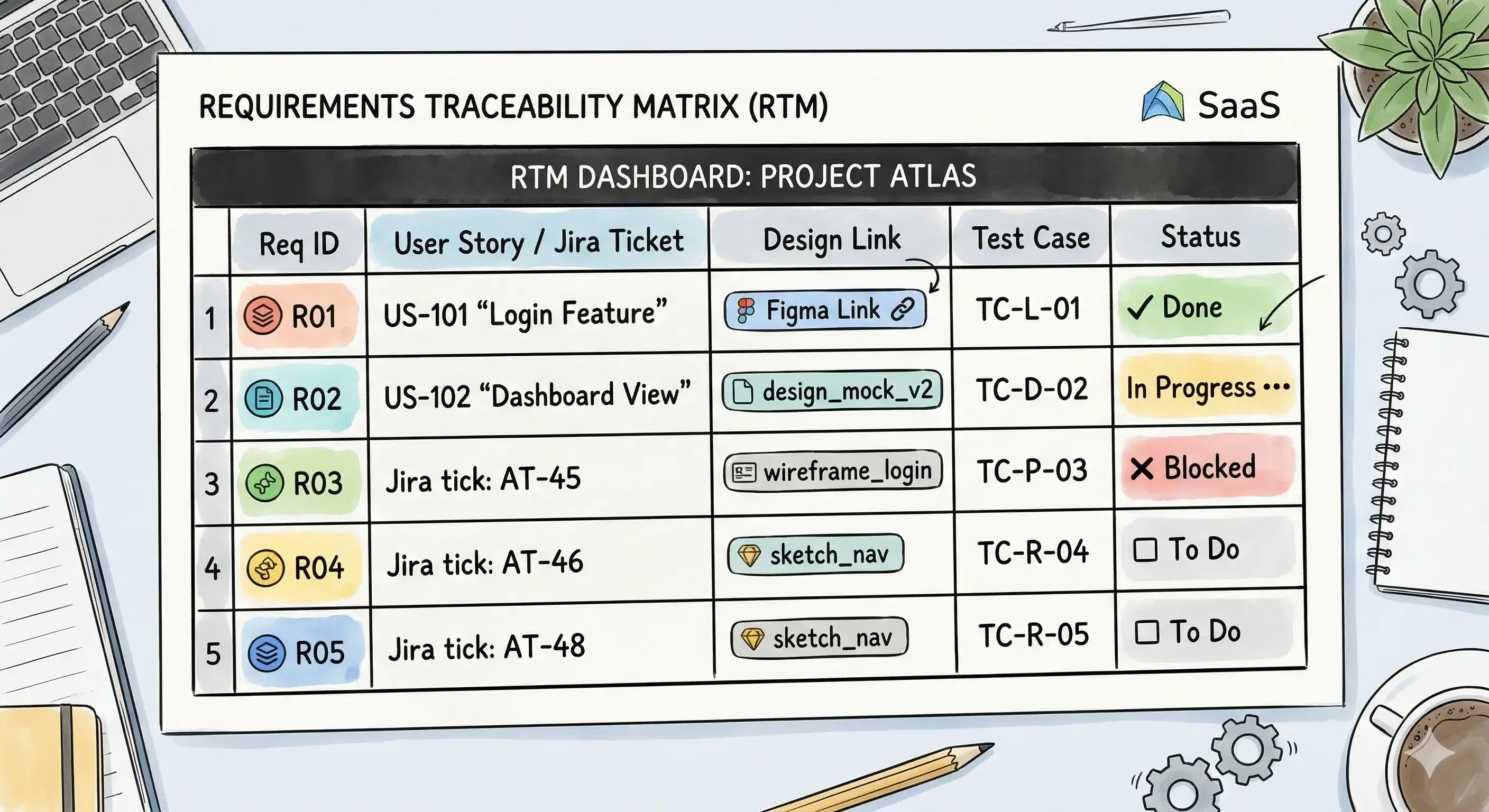
A requirements traceability matrix is a simple table that shows what connects to what. It is useful when requirements change, people forget details, or a release is close.
This guide explains how a requirements traceability matrix can show what got built and tested. It also shows how to set it up so it stays helpful during real work.
A few terms need plain meanings:
- Requirement: In simple words: a clear promise about what the product should do.
- Test: In simple words: a repeatable check that proves the promise works.
- Traceability: In simple words: links that show what connects to what.
- PRD: In simple words: a document that explains what to build and why.
- Jira: In simple words: a tool that stores work tickets (tasks) for a team.
A tiny example makes this real. Imagine a login screen. One requirement could be: “If the password is wrong, show an error message.” The RTM row links that requirement to the work ticket that built it and the test that checks it. Now anyone can see: asked for → built → checked.
Table of Contents
- How can a requirements traceability matrix show what got built and tested?
- What is an RTM, and why do teams use it?
- How can an RTM be made in Excel or Jira?
- What columns should an RTM have?
- Who keeps the RTM updated in an Agile team?
- How does an RTM stop scope creep (extra work sneaking in)?
- Frequently Asked Questions
- Final Thoughts on requirements traceability matrix
How can a requirements traceability matrix show what got built and tested?
A requirements traceability matrix (RTM) shows links between four things:
- the requirement,
- the work ticket that builds it,
- the test that checks it,
- the release where it shipped.
When these links exist, hard questions become easy:
- “Which tests cover the password reset feature?”
- “Which requirements changed in this release?”
- “Which work tickets belong to this requirement?”
Tiny example (login):
- Requirement: “If the password is wrong, show an error message.”
- Work ticket: “Add error state to login form.”
- Test: “Enter a wrong password and confirm the error message appears.”
- Release: “v1.4.0”
That one row already prevents confusion. It also makes handoffs safer.
This post follows a simple path: what an RTM is, how to build one, the best columns, who updates it, and how it blocks extra work sneaking in.
What is an RTM, and why do teams use it?
RTM stands for Requirements Traceability Matrix. In simple words: it is a table that connects each requirement to proof.
What problem does it solve? Teams often have these issues:
- A requirement is written, but no one knows if it was built.
- Something was built, but no one knows if it was tested.
- A release goes out, but it is unclear what changed.
- A bug appears, and no one can quickly find related work and tests.
How it works is simple. Each row is one requirement. The row stores IDs or links to the work and the tests.
Tiny example (password reset):
- Requirement ID: REQ-12
- Requirement: “Send a reset email when the email exists.”
- Work ticket: DEV-88
- Test: TC-19
- Status: Shipped
- Release: v1.5.0
Practical tip: Keep one behavior per row. One row should create one clear test.
Common mistake: Filling the RTM at the end of a project. If links are added late, links will be missing or wrong.
How can an RTM be made in Excel or Jira?
An RTM can be made in a spreadsheet first, then connected to tools later.
Option A: Excel (spreadsheet-first)
In simple words: Excel is a tool for tables.
Start with the smallest RTM that can answer real questions. Create these columns:
- Requirement ID
- Requirement (plain sentence)
- Work ticket (link or ID)
- Test (link or ID)
- Status
- Release
Fill one small feature end-to-end, like login and password reset. Add 3–5 requirements, not 50.
Tiny example:
- “If password is wrong, show an error message.”
- “Password reset email is sent when the email exists.”
- “Password reset email does not reveal if the email exists.”
Option B: Jira (tool-linked)
Jira stores work tickets. Many teams also connect Jira to a test tool that stores test cases and test runs.
The RTM logic stays the same:
- Requirement row → Jira ticket ID (build work)
- Requirement row → test case ID (check work)
- Requirement row → release tag or version (ship proof)
Practical tip: Start in Excel even if Jira exists. The spreadsheet makes the “right columns” obvious.
Common mistake: Building a giant RTM for the whole product on day one. Start small, then grow.
What columns should an RTM have?
Columns decide what questions the RTM can answer. The simplest useful set is six columns.
- Requirement ID
In simple words: a short name that stays stable, like REQ-12. - Requirement (plain sentence)
Write a testable promise. Avoid vague words like “improve” or “optimize.” - Owner
In simple words: the person responsible for keeping the requirement correct. - Work ticket
In simple words: the task that builds the requirement (often a Jira ticket). - Test
In simple words: the check that proves the requirement works. - Status
Use a short list that means clear things:
- Not started
- In progress
- Built
- Tested
- Shipped
Optional columns only if needed:
- Acceptance criteria: In simple words: what “done” means for this requirement.
- Test coverage: In simple words: what got tested (manual, automated, or both).
- Proof history (audit trail): In simple words: who changed what, and when.
Tiny example:
Requirement: “If the password is wrong, show an error message.”
Acceptance criteria: “Error message appears in under 1 second.”
Test coverage: “Automated + manual.”
Practical tip: If a tester cannot write a test from the sentence, the requirement is too fuzzy.
Common mistake: Too many columns. A 20-column RTM becomes a dumping ground.
Who keeps the RTM updated in an Agile team?
Agile is a common work style. In simple words: Agile means working in small steps and adjusting as learning happens.
In Agile teams, RTMs fail when nobody owns updates. A simple split works:
- Product manager (PM)
In simple words: the person who decides what to build and why. The PM keeps the requirement meaning correct. - Engineer
In simple words: the person who writes the code. The engineer links the right work ticket and marks “Built.” - QA / tester
QA means Quality Assurance. In simple words: checking the product for mistakes. The tester links tests and marks “Tested.”
Tiny example:
The PM writes three password reset requirements. Engineers link each row to DEV tickets. Testers link each row to test cases. When shipping happens, the release tag is added.
Practical tip: Make RTM updates part of “done.” If a row has no work link or test link, it is not done.
Common mistake: Waiting for a “cleanup week” to update links. That is when details are lost.
How does an RTM stop scope creep (extra work sneaking in)?
Scope creep is a quiet problem. In simple words: scope creep is extra work sneaking in after the plan was agreed.
An RTM stops it with one calm rule:
Every work ticket must point to a requirement row.
If a ticket cannot point to a row, then one of three things is true:
- It is a new requirement (so it needs a new row and tests).
- It is a nice-to-have (so it can be delayed).
- It is a bug fix (so it needs tracking and a test).
Tiny example:
A login update is planned. Midway, someone says “add social login.” The RTM shows there is no requirement row for social login. That forces a clear decision: add it properly, or save it for later.
Practical tip: Add a “Requirement ID” field to the work ticket template.
Common mistake: Using the RTM as a weapon. The RTM should create clarity, not blame.
Frequently Asked Questions
What are the 3 ways to trace requirements (forward, backward, both)?
Forward traceability links a requirement to the work and tests that come after it. Backward traceability links a test or release back to the requirement. Bidirectional means both directions are possible.
Why do audits and rules make RTMs useful?
Audits often ask for proof that a promise was checked. RTMs provide one place to show that proof and show what changed over time.
Can an RTM update itself using CI/CD (build + test automation)?
CI/CD is a way to automatically build and test code. In simple words: an automated pipeline that runs checks when code changes. RTMs can be partly automated by pulling links from tickets, test results, and releases, but requirement text still needs a human.
If a rule says “prove traceability fast,” what should an RTM track?
Track stable requirement IDs, the work tickets that changed them, and the tests that prove them. In regulated work, rules may also push “fast reporting,” like providing records in an electronic, sortable format. FDA traceability materials include an electronic sortable spreadsheet approach, and FDA has stated it will not enforce the Food Traceability Rule before July 20, 2028. (fda.gov)
What does “digital audit twin” mean, and what should teams do about it?
“Digital audit twin” is usually a concept, not a single official rule name. It often means a living, real-time view of proof, like continuous audit-ready trace links. Digital twin research and traceability guidance often describe real-time monitoring and continuous oversight as the goal. The practical lesson is simple: keep trace links updated continuously, not only at the end. (ResearchGate)
Final Thoughts on requirements traceability matrix
A requirements traceability matrix is a small table that protects big projects. It shows what got asked for, what got built, and what got tested.
This tool is most useful when requirements change often, many people touch the same feature, or proof matters during reviews.
This tool is not useful if nobody will update it. A stale RTM creates false confidence.
A simple next step works today: pick one feature like password reset, create six columns, add three rows, link work and tests, and update status as work moves.